Making USNG Mapbooks with ArcGIS Pro
This is a basic guide for creating a map book based on the U.S. National Grid (USNG), using Map Series in ArcGIS Pro. These instructions are general in nature and assume a basic proficiency with ArcGIS Pro.
Map Series is a standard feature of ArcGIS Pro. These instructions are based on specific USNG 1K polygon data and the associated field names and feature attributes, and are designed to create 8½" × 11" maps with 1000 meter (1K) map extents at 1:6000 (1" = 500') scale.
Preparation Steps
Download Sample ArcGIS Pro Project Package
Download and extract the project to your local environment:
- NG1K.ppkx - 1KM Maps use a letter (8.5" × 11") size layout (ArcGIS Pro Project Package)
Extract the Project and associated data using the ArcGIS Pro "Extract Package" Tool.
Download USNG Grid Data
Download 1K polygon shapefiles for your area of interest. These can be obtained from the USNG Info Center Website GIS Data Page.
- Available by FEMA region or individual state
- 100-meter resolution shapefile format
- Includes all necessary field attributes for map series
Open and Configure the Project
Open NG1K.aprx in ArcGIS Pro. This map document has two map frames:
- "Layers" - The main map frame
- "Index" - The map index frame
Important: The coordinate system on both data frames is set to UTM Zone 15N. You must change the coordinate system to the UTM Zone corresponding to the USNG Grid Zone for the maps you're creating.
Change the data source for the layer named "1K Polygons" in both maps to the shapefile you downloaded.
Create Your Map Series
Follow these steps to generate your mapbook:
- Open "Map" and remove the existing "1K Polygons selection" layer (this removes the sample map series)
- Select the polygons for which map pages are desired from "1K Polygons"
- Make a new layer from selected features (named "1K Polygons selection" by default)
- Open the layout "NG1K" and configure your map series settings
- Add additional layers, adjust symbolization and labeling as needed
Export Your Maps
Export the map pages to PDF files using Share → Output → Export Layout
Export Options:
- Single PDF file - Easy option for creating complete map books
- Multiple Files - Creates a library of map pages named using the full USNG designation as the filename (recommended for flexibility)
Sample Output
Here's an example of what you can create using these tools and instructions:
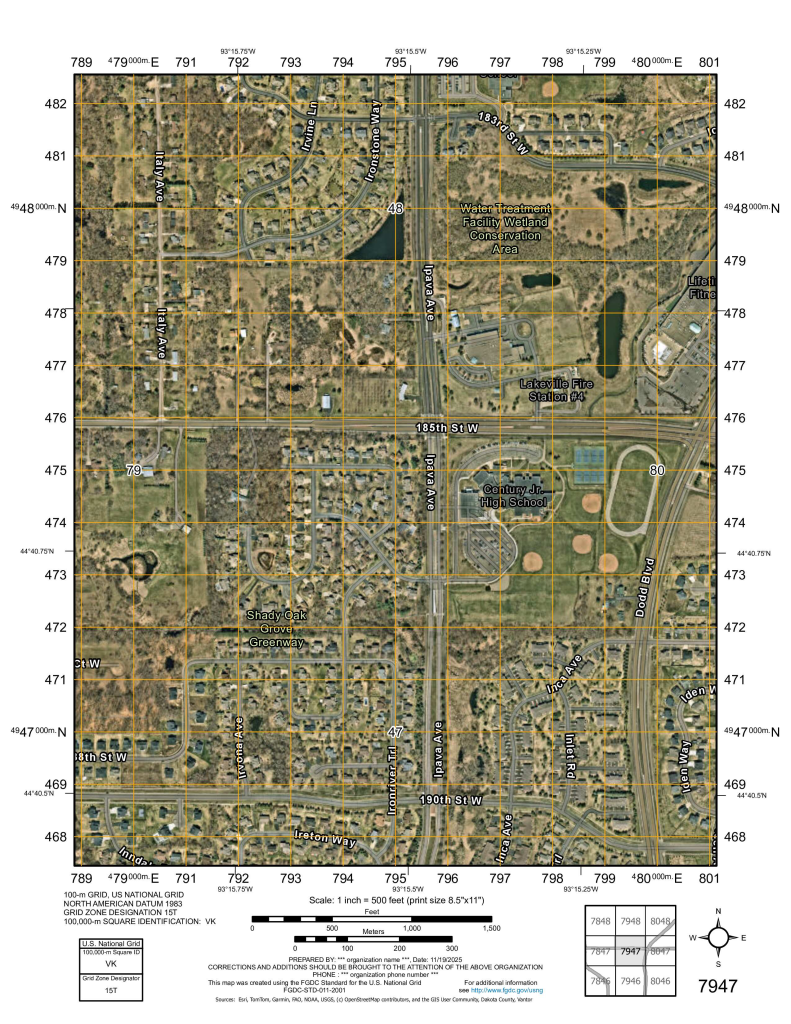
Example: Lakeville, MN
This sample demonstrates a typical USNG mapbook page created using the workflow outlined on this page.
Map Specifications:
- USNG Coordinate: 15T VK 7947
- Grid Zone: 15T
- 100km Square: VK
- Scale: 1:6000 (1" = 500')
- Size: 8.5" × 11"
- Grid Resolution: 100 meters